A CNC price you can explain
Stock and material
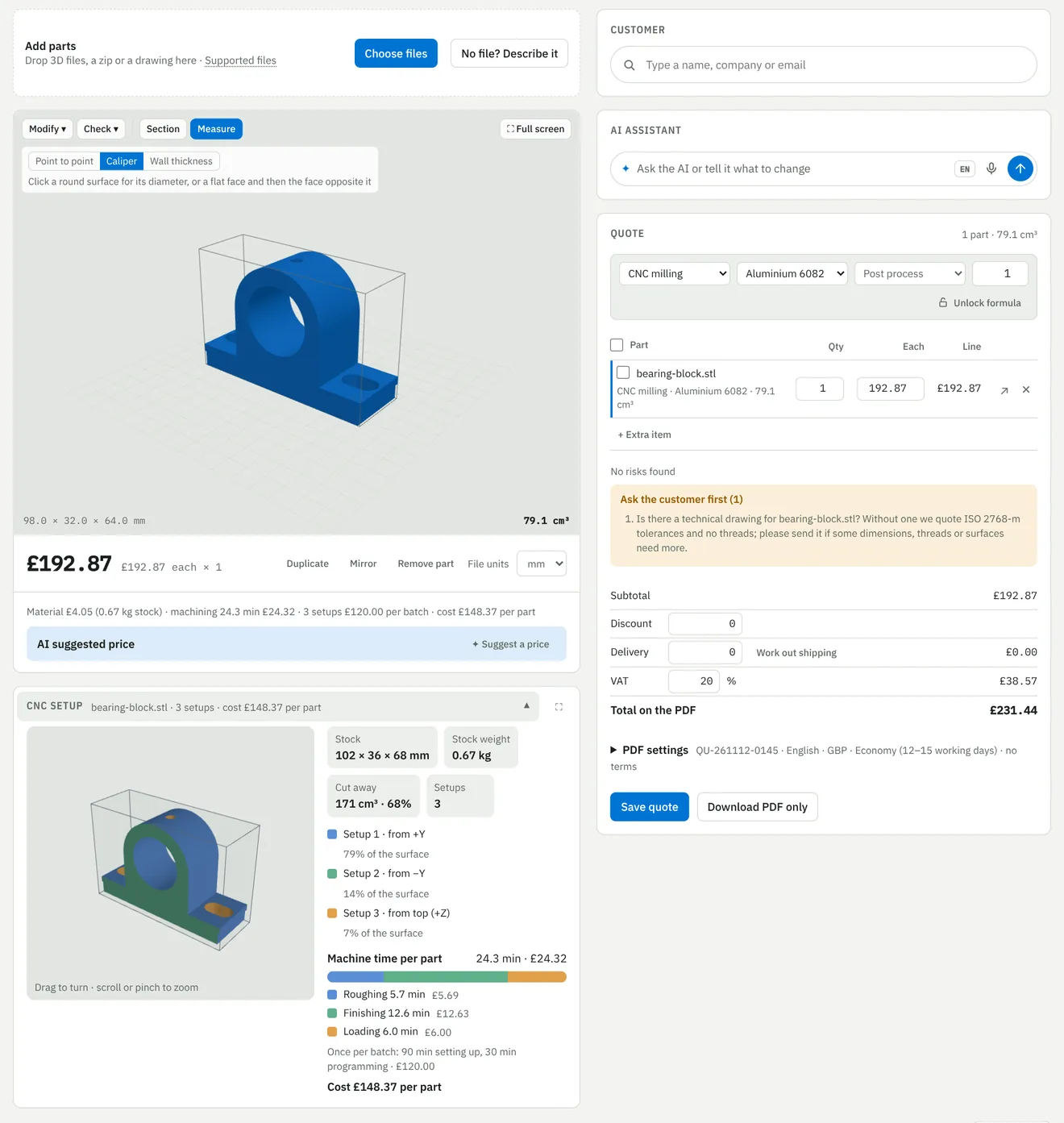
The app works out the stock block around the part, its weight and how much is cut away, and prices the material from your own rates.
Setups, shown on the part
Every face is assigned to a setup and coloured on the 3D model, so you see why a part needs one setup or three.
Machine time, split up
Roughing, finishing and loading time per part, plus setting and programming once per batch, so the price falls as the quantity rises.
Your machines
Tell it what you have: 3-axis, 3+2, 4-axis or 5-axis mills, horizontal mills, lathes, mill-turn or Swiss-type. More axes mean fewer setups in the price.
What the drawing asks for
Tolerances, threads, surface finish and inspection from the drawing add their own time. With no drawing, the quote asks the customer for one first.
Your formula decides
The cost model gives the cost. Your own pricing rule sets the selling price, margin and minimum order.
From the 3D file to the invoice
- Drop in the STEP or STL fileThe part is measured and the CNC setup is worked out on upload.
- Check the price and sendChange material, quantity or margin, or ask the AI to do it in one sentence. The quote goes out as a PDF and a portal link.
- Make it in-house or outsource itSend a purchase order to a supplier from the same quote when the part is not for your own machines.
- Check, ship and invoiceQuality checks, delivery note and invoice from the same order. It connects to your QuickBooks or Xero account.
See it on your own machined parts
Send us a few STEP files and your machine list. We will quote them live with you on a demo call.
Part of the Sales module, from €300 a month. See pricing
Also from NeuroParts: Text to CAD · MJF · Pricing
Autodesk screen shots reprinted courtesy of Autodesk, Inc. Autodesk and Fusion are registered trademarks of Autodesk, Inc. NeuroParts is not affiliated with Autodesk. Screens are shown with sample data.